FAQ · Investor
Ictradex Cyclops
Pro and EliteYour whole portfolio on one page: what it is worth, how it is spread, what it may pay, and how each stock's price sits against its Oracle value.
Cyclops is a portfolio page you fill in yourself. You type what you hold; it works out the totals, the charts and the checks as you type. It is not linked to a broker and it never places an order. The pictures below use a made-up example portfolio.
Three charts that move as you type
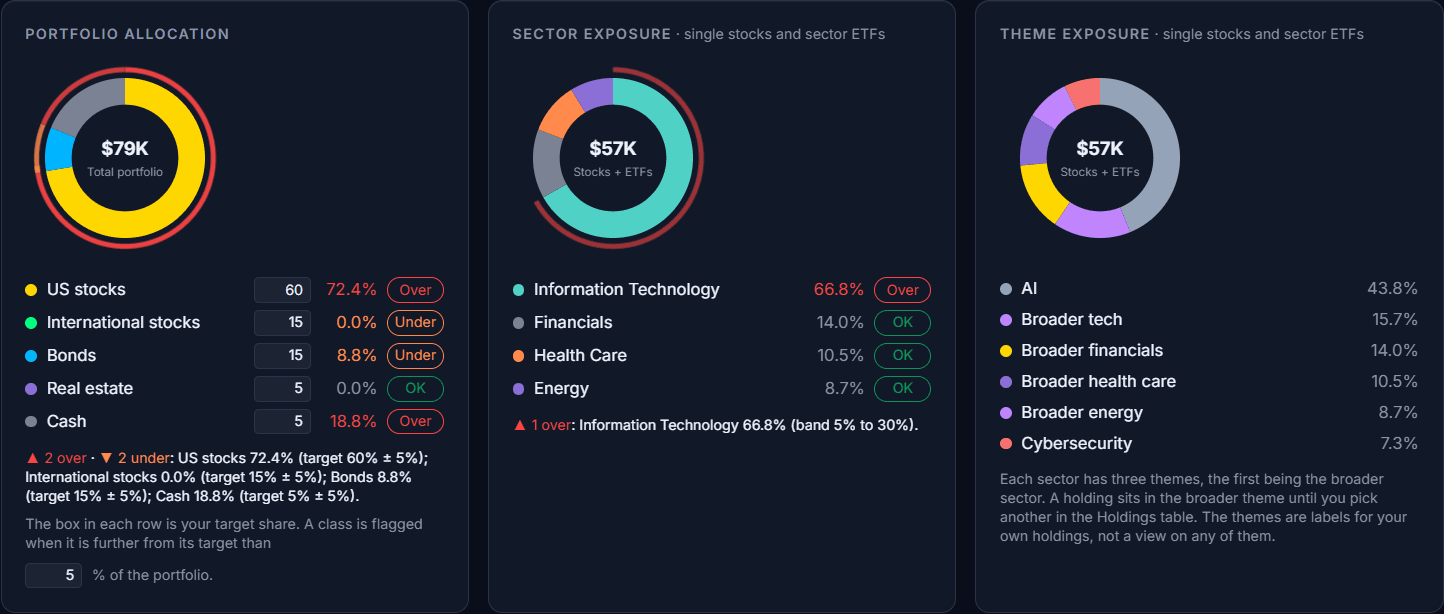
Portfolio allocation splits your money by asset class and marks a class that is further from your own target than the band you set. Sector exposure splits your single stocks and sector ETFs by sector, against your own most-in-one-sector limit. Theme exposure splits the same holdings by theme, for example AI or Cybersecurity inside technology. Point at a slice to see its share.
Your holdings, with the Oracle value beside each stock
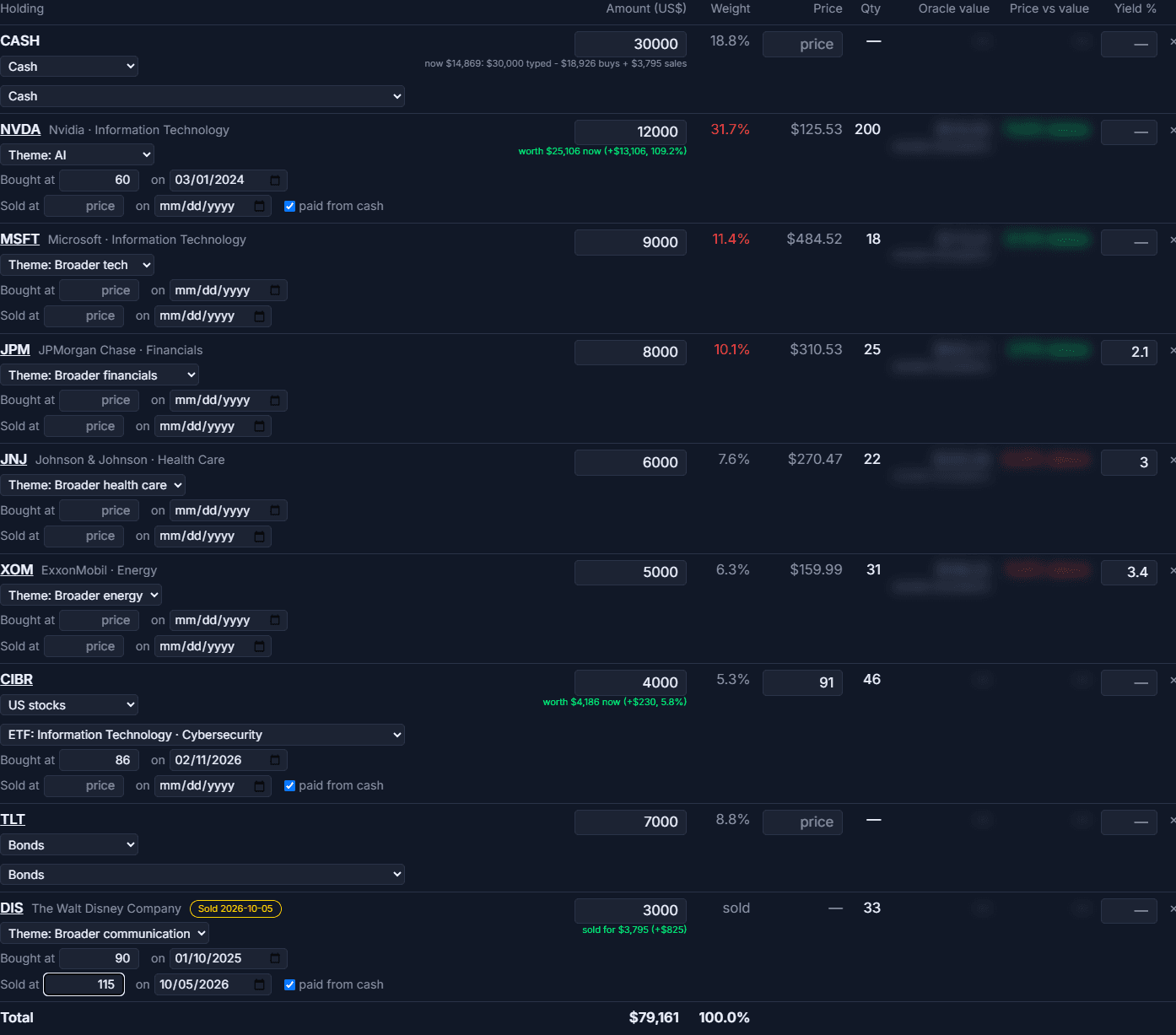
Add a ticker and an amount. For an S&P 500 stock the page fills in the company, sector, stored price and the Oracle value, and shows how far the price is above or below that value. Add each buy and each sale as a line: the date, the whole number of shares and the price a share. The holdings table shows your shares, your average price, what they are worth at the stored price, your profit and what you made on sales. A second table lists every line, newest first, with the profit on each sale. A holding you have sold out of leaves your totals and stays as a record. Funds, bonds and cash go in too: you describe them yourself.
A cash row that follows your trades
Keep a CASH row and tick "paid from cash" on a buy: the cost comes out of your cash. Record a sale and the money goes back in. If your buys add up to more than the cash you have, the page tells you by how much.
A sizing check against limits you set
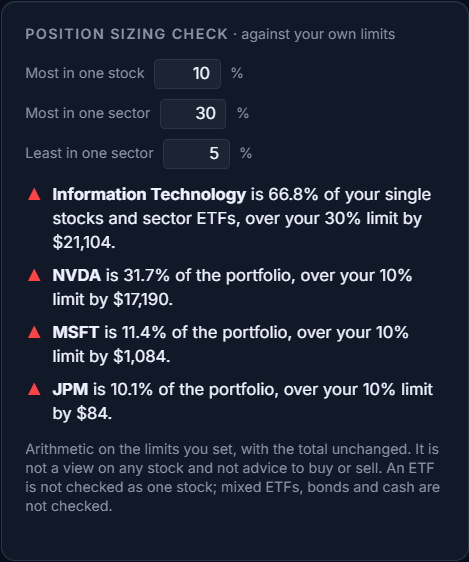
You set the most you want in one stock and in one sector. The page lists anything over those limits and by how many dollars. It is arithmetic on your own numbers: it does not say what to buy or sell.
A dividend estimate after tax held back
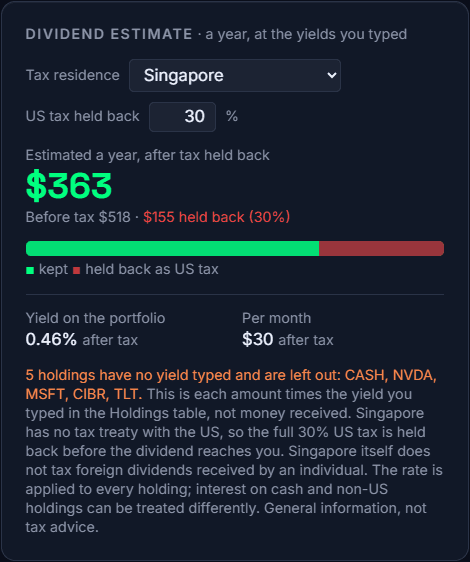
Type a yield for a holding and the page estimates a year of dividends. Pick where you live for tax and it takes off the US tax held back on dividends, for example 30% for a Singapore resident. Other countries: type your own rate.
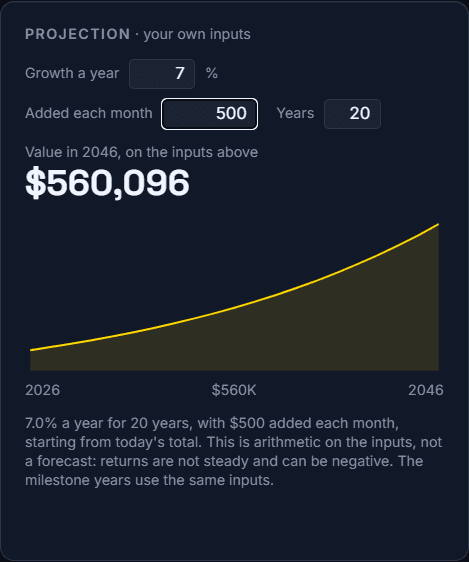
A projection and milestones on your own inputs
Type a growth rate, an amount you add each month and a number of years. The page shows where the sum ends up and the year each milestone would be passed. It is compound arithmetic on your inputs, not a forecast.
Hide your figures with one click
"Hide figures" replaces your amounts, totals, quantities and gains with dots, for when someone can see your screen. Percentages and public prices stay. Click again to show them.
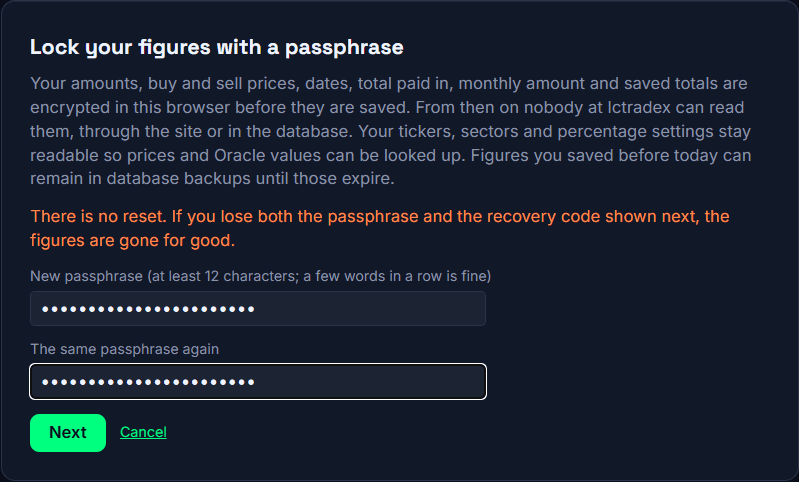
Lock your figures with a passphrase
Press "Lock figures with a passphrase" beside Save and choose a passphrase. From then on your amounts, the prices and dates you bought and sold at, the total you paid in, the amount you add each month and your saved totals are encrypted in your own browser before they are saved. Ictradex stores text it cannot read, so nobody here can see how much you hold, through the site or in the database. You are shown a recovery code once, in case you forget the passphrase. You type the passphrase once each time you open Cyclops, "Lock now" asks for it again at once, and "Remove lock" puts everything back as it was. The lock is optional and included in the plan.
Questions
- Which plan includes Cyclops?
- Pro and Elite. It is not part of the Free plan.
- Does it connect to my broker?
- No. Nothing is imported and no order is ever placed. You type your holdings yourself, and you can change or remove them at any time.
- Are the prices live?
- No. Prices and Oracle values are stored figures for current S&P 500 stocks, refreshed during the trading day, and the page shows the time they are from. Your totals move when the stored prices move or when you save new amounts.
- What can I add besides S&P 500 stocks?
- Any ticker or short label: other stocks, ETFs, bonds and cash. For these you choose what it is, its sector and theme, and type its price yourself. Only S&P 500 stocks get an Oracle value.
- What is the Oracle value?
- A value for one share worked out from the company's own filed numbers and a set of stated assumptions. If you have saved your own assumptions for a stock on the Oracle page, Cyclops uses yours; otherwise it uses the standard ones, and it says which. It is one way of valuing a company, not a price target.
- Does Cyclops tell me what to buy or sell?
- No. Every check is arithmetic on limits and targets you set yourself. Nothing on the page is a view on any stock.
- Who can see my portfolio?
- Only you, when signed in. Each member's portfolio is stored against their own account and is not shown to other members. Without the passphrase lock the figures are stored readable, so Ictradex staff with database access could read them. With the lock on, they cannot.
- Can Ictradex see how much I hold?
- Not if you turn on the passphrase lock. Your amounts, the prices and dates you bought and sold at, the total you paid in, the amount you add each month and your saved totals are then encrypted in your own browser before they are saved. From then on Ictradex stores text it cannot read, through the site or in the database. Your passphrase never leaves your browser. Figures you saved before turning the lock on can remain in database backups until those expire, and removing the lock stores everything readable again.
- What stays readable when the lock is on?
- Your tickers, what each holding is (asset class, sector, theme), a price or yield you typed for a fund, and your percentage settings. The site needs the tickers to look up stored prices and Oracle values. None of it says how much money you have.
- What if I forget my passphrase?
- When you turn the lock on you are shown a recovery code once. It unlocks your figures and lets you set a new passphrase. If you lose both the passphrase and the recovery code, nobody can unlock the figures, Ictradex included: you keep your tickers and type the figures again. You can remove the lock at any time while you can still unlock it.
- Is anything saved without my asking?
- No. Nothing is saved until you press Save, and the page warns you if you try to leave with unsaved changes. Each save also records that day's total, which builds your net worth line over time.
- How many holdings can I keep?
- Up to 50, counting holdings you have sold out of. A ticker has one row: add each buy and sell as a line.
- Is the tax figure right for me?
- It is an estimate from the rate shown, which you can change. It is a rough sum, and your own position can differ. Ask a tax professional about your own case.
Cyclops is included in the Pro and Elite plans.
See the plansGeneral market information and education only, not financial advice.